User status
Access: --
Credits: --
Role: --
Verified: --
Membership: --
Last verified: --
Last purchase: --
Account: --
Track, verify, and protect your collection.
Hashlock your cards to create permanent proof and condition records.
Dashboard
Step-by-step: add a card, select it, then Hashlock to secure your proof record.
Card Entries
Verified
Credits
Total Value
Last Hashlocked
High-Value Cards (>= $250)
Last Updated
Owned / Wishlist
Added (7d / 30d)
Value Delta (30d vs prior)
Last activity
Unrealized P/L
Collector Metrics
User status
Access: --
Credits: --
Role: --
Verified: --
Membership: --
Last verified: --
Last purchase: --
Account: --
Set completion (your ledger)
Trade desk
--
Verification and duplicates
--
--
High-value concentration
--
--
Grading breakdown
--
Average grade: --
Import your collection in 60 seconds
Bring in a spreadsheet or CSV, preview it, and add hundreds of cards fast.
Tip: Start with your highest value cards and Hashlock them first.
Public Verification
Validate asset existence, integrity, current state, and chain continuity without opening the full app workspace.
Use Quick Navigation or the header button next to Collector Resources.
Trade
Build a trade sheet and generate a shareable read-only link for a trade night.
Scope
Tip: go to Card Entries, filter to "For Trade", select rows, then come back here.
Fields
Notes
No trade link generated yet.
Links
You can revoke links at any time.
No trade links loaded.
Shop Back Office
For founders, admins, and shop keepers. Track inventory, prep exports, and jump to Hashlock quickly. Hashing still uses normal credit billing.
In Stock
Reserved
Sold
Low stock (<= 1)
Needs Hashlock
Ask (In Stock)
Cost (In Stock)
Potential Profit
Inventory Workspace
Open the standalone inventory workspace for all shop inventory functions, receipts, CRM, staff roles, and audit log.
Inventory
Tip: click Add item to create a row, fill it out, then Save shop inventory to store it on the server.
Filters
Presets + Bulk
Shop inventory is empty.
| Name | Set | Set Number | Condition | Quantity | On Hand | On Hold | Location | Status | Actions | |
|---|---|---|---|---|---|---|---|---|---|---|
| No shop inventory yet. | ||||||||||
Hash Vault
Shows only cards you have Hashlocked. This is your binder-style view for trades and verification.
Import preview
Ledger
Protection
Protect your highest value card with Hashlock.
New entry
Hashlock
Select cards in Card Entries, then follow the steps below to capture photos and lock a proof record.
Credits: 1 Hashlock = 10 credits
Credits never expire. Buy once, use anytime.
What you get: locked snapshot + QR certificate + binder record
Use it for trades, sales, and provenance.
Guided Wizard
Open the interactive wizard for screenshot-guided steps and in-flow actions.
Step 1
Choose exactly one card in Card Entries.
Step 2
Set identity and condition before proof signing.
Step 3
Capture both sides of the same card with the camera.
Step 4
Confirm and create the cryptographic proof record.
Quick Walkthrough
Select a card to begin Hashlock.
Selected card
None selected
Go to Card Entries and select exactly 1 card to Hashlock.
Adds a trust marker to the certificate for buyer-facing flows.
Fill the frame with the card and keep the card edges visible.
No camera images captured yet.
Front photo not captured.
Back photo not captured.
This is a safety check to discourage re-used images. Your photos are included in the signed proof package.
Confirmed
Saved to your ledger and stored in your Vault.
Hash Binder
No signed records yet.
Multi-Card Hashing
Create Merkle-based batch snapshots from selected cards and preserve root history.
Layer 1: per-card hash (Hashlock digest when available, deterministic fallback otherwise).
Layer 2: batch hash from sorted card hashes.
Layer 3: Merkle root for scalable verification and tamper detection.
Each snapshot stores chain continuity (previous root + sequence). Nothing is deleted.
Guided Multi-Hashlock
Flow: select 2-5 cards -> snapshot -> Merkle root -> Hashlock each card. Cost is 10 credits per card.
Select 2-5 ready cards, then click "Use selected cards".
No guided queue loaded.
Audit: --
Selection Preview
No cards selected yet.
Latest Snapshot
No multi-card snapshots yet.
Snapshot History
No snapshot history yet.
Card Set Hashing
Generate Merkle snapshots for one set at a time and preserve set-level root history.
Audit: --
Set Preview
Pick a set to preview cards.
Latest Snapshot
No set snapshots yet.
Set Snapshot History
No set snapshot history yet.
Purchase
Connect to load your credits.
Referral
Generate a referral code for a friend. They can enter it on the Launch page to buy access for $4.99.
Referral codes can be used once. Share it privately.
Shop Plans
Visible only to shopkeeper, admin, and founder accounts.
Overage metering: Basic (+500 scans or +250 registrations = $5). Pro (+1000 scans or +500 registrations = $10).
1 Hashlock = 10 credits. Credits never expire. Pro Membership ($9.99/month) includes 200 monthly credits and early feature access.
Tools
Import/export is in Card Entries. Use this section for maintenance, backup, and multi-device sync.
Demo
Account Sync
Account Sync keeps your ledger consistent across devices automatically. This sync is stored on the server (not passphrase-encrypted).
Not connected.
Cloud Sync
Cloud Sync stores an encrypted blob on the server so you can move your ledger between devices. Your passphrase is never sent to the server and cannot be recovered.
Auto sync is off.
Note: Syncing photos can exceed the Cloud Sync size limit. If upload fails, lower the limit or turn photos off.
How to use
Not connected.
Collector Resources
Third-party sites. Dex Ledger is not affiliated with these services.
Pricing
Database
Official
Grading
Admin
Visible only to admin accounts. Manage access, founder status, credits, and disputes.
Founders: grants free access + unlimited Hashlocks.
Dispute: set status to frozen_dispute to block purchases and Hashlock.
Shop Codes
No shop codes loaded.
Shop Keep
View all shopkeeper inventory summaries and latest shop updates.
Run repair to normalize stale shop role links.
No shopkeeper updates loaded.
Loading...
System
Accounts whose username contains smoke.
No system bots loaded.
Events
Loading...
Events
System-bot and smoke-test activity is separated here from normal recent activity.
Loading...
Analytics
Server-side only. Country is from Cloudflare headers. No raw IPs are stored.
Pageviews
Human pageviews
Bot pageviews
Requests
Excluded pageviews
Unique (7d)
Unique (30d)
Countries (7d)
Updated
Purchases
Revenue, purchase count, buyer count, and conversion for the last 7 days (live-mode Stripe only).
Loading...
Purchases
Same purchase metrics over a 30-day window to compare short-term vs monthly trend.
Loading...
Top
Most viewed pages in the current weekly tracking window.
Loading...
Top
Pageviews by visitor country code (from Cloudflare `cf-ipcountry` headers).
Loading...
Top
Edge datacenters handling traffic (`CF-Ray` colo suffix), useful for latency/routing visibility.
Loading...
Top
Third-party domains sending traffic to your site (self-domain traffic excluded).
Loading...
Top
Same-domain navigation sources (for example, `pocketcardledger.com` page-to-page flow).
Loading...
Source
Source mix for pageviews: Direct, External, Internal, and Unknown (count + percentage).
Loading...
Split
Estimated device class from user-agent: desktop, mobile, tablet, or unknown.
Loading...
Daily
Daily pageviews and uniques for trend monitoring over the last 14 days.
Loading...
Newsletter
Owner-only. Send release notes and personalized updates to everyone who opted in on the launch page.
Newsletter audience: --
Personalization tokens
Use {{name}}, {{first_name}}, or {{email}} in the subject or message.
Subscribers
No subscribers loaded.
Campaigns
No sends yet.
Admin-only. Use this to verify outbound email is working for password resets and verification codes.
SMTP status: --
Checklist
Account Settings
Support
Appearance
Tip: use Light mode for card-table glare and photos.
Appearance
Note: Translation coverage will expand over time. If a section is not translated yet, it will remain in English.
Security
If you signed in on multiple devices, you can revoke all sessions.
Trial
You can end your trial early. This cannot be undone.
Danger zone
Permanently deletes your account and associated server data for this username.
Recovery
Add a verified email so password recovery can be enabled. (Weekend build: verification uses an in-app code.)
Not sent.
Backup
Saves your ledger, binder, preferences, and signing key to a backup file. Keep the backup code safe (required to restore).
Recovery
If you changed devices and your local ledger is empty, upload your backup file and enter your backup code.
Hash Certificate
No history loaded.
Hashlock
Stored in Vault and added to your binder.
Review
Double-check the snapshot before spending credits.
Card
-- --
Owner: --
Condition: --
Trade verified: --
Market/card: --
Cost/card: --
Proof
Guided Wizard
Step 1 of 4
Selected card
No single card selected
Select exactly one card from Card Entries to begin.
Wizard follows one-card-at-a-time Hashlock.
Step 1
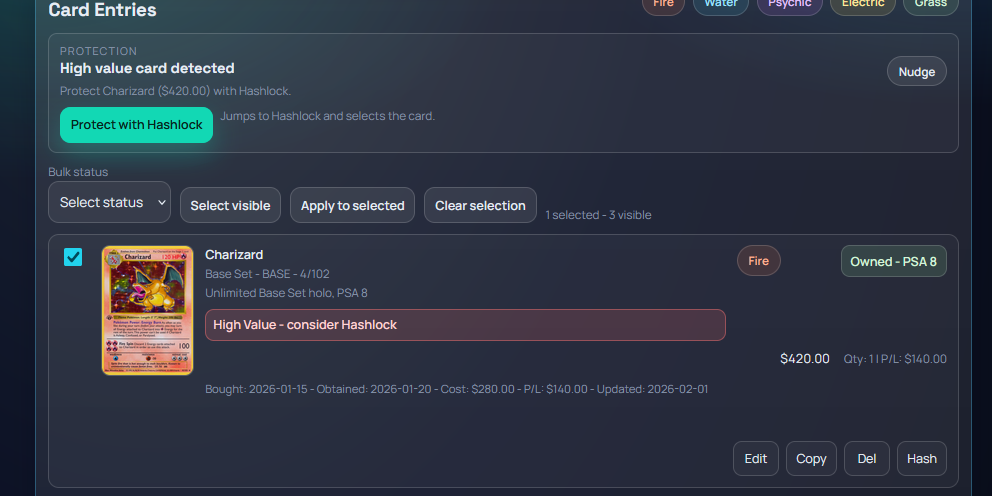
Hashlock runs one card at a time. Pick exactly one non-hashlocked card.
Step 2
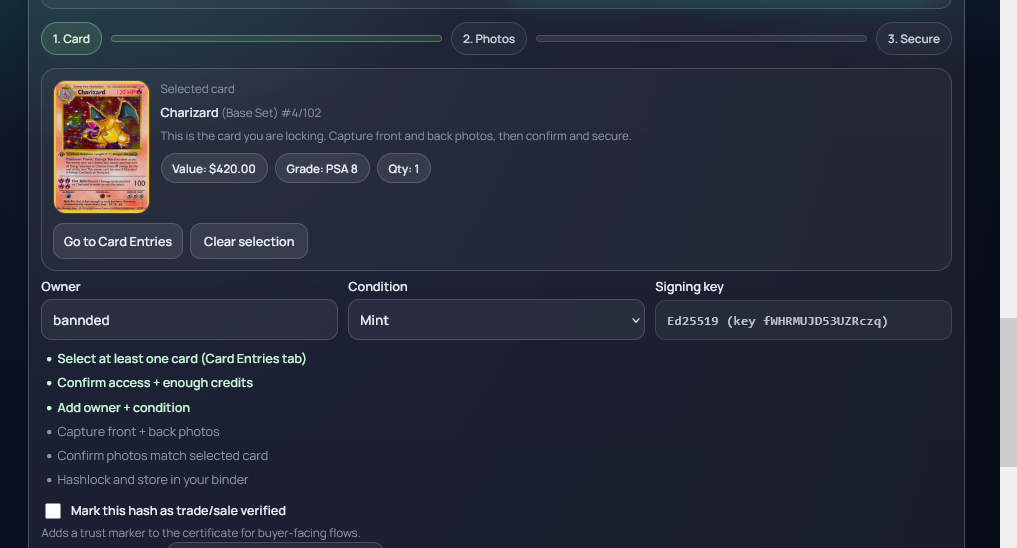
Fill owner and condition so the signed proof captures custody metadata.
Step 3
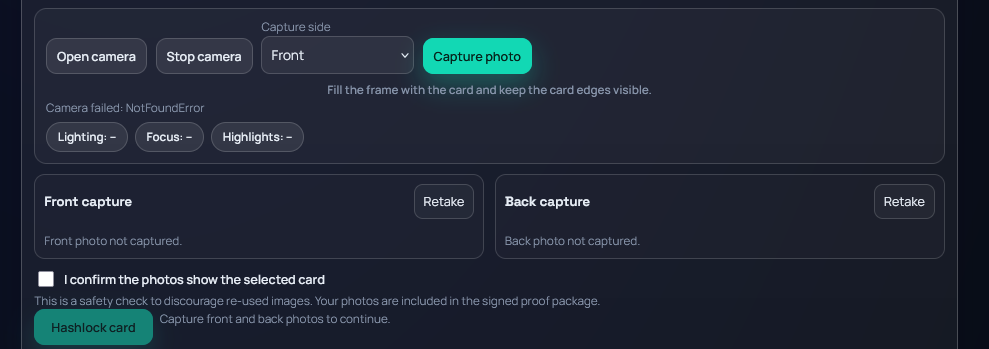
Use camera capture for both sides. Keep edges inside frame and avoid glare.
Step 4

Confirm photos, review the proof package, then sign and lock the card record.
Use the action button to jump directly to this step.